

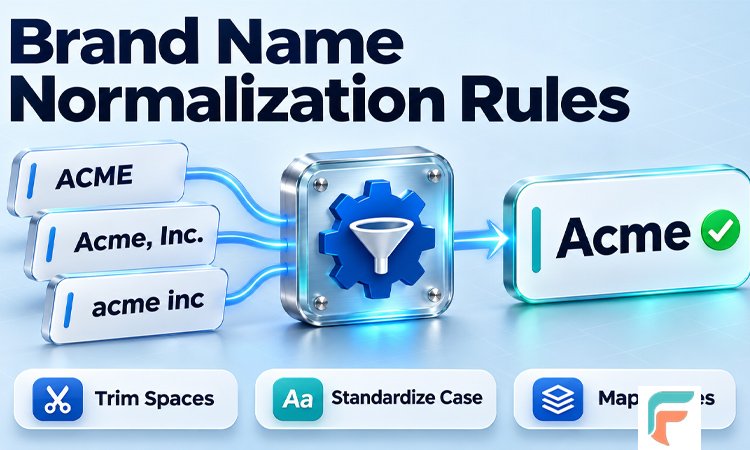
Open any company’s customer list and you will often see the same business written in many ways. One row says “Acme Inc.”, another says “ACME INCORPORATED”, and a third says “acme”. To a person, these are the same company. To a computer, they are three different companies.
This small problem causes big headaches. Reports show the wrong numbers. Sales teams call the same customer twice. Marketing emails go out in duplicate. The fix is called brand name normalization, and it is easier than it sounds.
In this guide, you will learn what brand name normalization rules are, why they matter, and how to apply them in seven simple steps. You will also find real examples, common mistakes, and a list of ten frequently asked questions at the end.
What Are Brand Name Normalization Rules?
Brand name normalization rules are a set of clear instructions that turn many versions of a name into one standard version. That standard version is often called the canonical name. Once you pick it, every messy record can be matched to it.
For example, take these four entries:
- Toyota Motor Sales, U.S.A., Inc.
- TOYOTA MOTOR SALES USA INC
- Toyota Motor Sales USA
- toyota
A good set of rules can bring them all to one clean name. Then your system treats them as one company, not four.
You may see this idea described in two ways. In data work (CRM, sales, and marketing operations), it means cleaning company names so records match. In marketing and SEO, it means keeping a brand’s name the same across websites, directories, and platforms. Both ideas share the same goal: one name, used the same way everywhere. This article focuses mostly on the data side, but the rules help brand teams too.
Why Brand Name Normalization Matters
Clean names might look like a small detail. In practice, they affect many parts of a business.
You find duplicates faster. When names follow one format, it is much easier to spot repeated records in your CRM and marketing tools.
Your reports become more accurate. If all records for one company roll up under one name, you can see the true number of deals, contacts, and sales.
Your teams save time. Sales, support, and legal teams do not need to guess which “Acme” is the right one.
Your checks become more reliable. Some companies also use clean names when they screen customers for legal and compliance reasons. Fewer false alerts means less manual work.
One example comes from the sales operations company Openprise. It points to the payroll software company Payfit, which cut the share of duplicate companies in its CRM from 30% to 9% by using name cleaning techniques. That is a big drop from a simple process.
Before You Start: Three Smart Habits
Before you write any rules, build a few good habits. They will save you from mistakes later.
1. Look at your data first
Check how many different company names you have. Look for the most common problems. Do many names end in “Inc.” or “LLC”? Are many in all capital letters? This quick check shows which rules matter most for you.
2. Always keep the original name
Never overwrite the raw name. Store the cleaned name in a new column or field. The original registered name is useful for contracts, invoices, and identity checks. Only the display name needs to be normalized.
3. Choose rules based on where the name will be used
A name used in a sales email may not need “LLC” at the end. A name used on an invoice might need it. The data cleaning platform Datablist suggests deciding your rules by destination, so each use case gets the right version.
The 7 Easy Steps
The order of your rules matters. Most tools run rules one after another, so a change in step one can affect step five. The steps below follow a safe order.
Step 1: Clean Up Spaces and Strange Characters
Start with the simplest problems. Names often come with extra spaces at the start or end, double spaces in the middle, or quotation marks around the whole name. These come from form entries, CSV files, and web scraping.
These small errors matter. A name with a space at the end will not match the same name without one. Clean them first, before any matching begins.
Good actions for this step:
- Remove spaces at the start and end.
- Change double spaces into single spaces.
- Remove quotation marks around the name.
- Remove symbols that do not belong, such as
@or!.
Example: “Acme@Solutions!” becomes “Acme Solutions”.
Be careful here. Some symbols are part of a real brand. Keep hyphens in most cases, and keep other marks when they belong to the name.
Step 2: Handle Legal Endings
Legal endings show what type of company it is. You will see them often: Inc., Corp., LLC, Ltd., GmbH, and SA. Most of the time, people do not use them when they talk about a company, so removing them helps records match.
Example: “Symantec Corporation” becomes “Symantec”.
There are two important notes. First, keep a short exception list for brands where the ending is part of the name. Second, if the data will be used for billing or contracts, you may want to keep the legal form in a separate field.
Step 3: Fix the Capital Letters
Capital letters are a common reason for messy data. Some names arrive in ALL CAPS, and others in all lowercase. Pick one style, such as title case, and apply it to everything.
Example: “ACME SOLUTIONS” becomes “Acme Solutions”.
There are two special cases to remember:
- Short names (under four letters) are often best in capitals. “ibm” should become “IBM”.
- Brands with unusual spelling, such as eBay, should stay as they are. Add them to your exception list so your rules do not break them.
Some teams also make everything lowercase, but only for matching behind the scenes. People still see the nicer, readable version.
Step 4: Standardize Punctuation and Symbols
Punctuation is another place where names drift apart. Commas, periods, and ampersands appear in many forms.
Here are the common fixes:
- Remove periods in abbreviations. “A.B.C. Corp.” can become “ABC”.
- Remove commas before endings. “Oracle, Corp.” becomes “Oracle Corporation” or just “Oracle”, depending on your rule.
- Pick one form for “&” and “and”. Use the same one every time.
- Join or separate words the same way. “Wal-Mart” can become “Walmart”.
- Remove extra details in brackets, such as stock codes. “Acme (NYSE: ACM)” becomes “Acme”.
Again, do not remove too much. A name like AT&T should keep its symbol, and a name like Studio 54 should keep its number. Numbers, accents, and brand marks can be part of the real name.
Step 5: Deal With Short Forms and Nicknames
People love short forms. “MSFT” means Microsoft. “Big Blue” means IBM. “Mfg” means manufacturing. Rules alone cannot always catch these, so you need a helper: an alias list.
An alias list is a simple table. One column holds the known variations, and the other holds the correct standard name.
| Messy entry | Standard name |
|---|---|
| MSFT | Microsoft |
| Big Blue | IBM |
| Google UK Limited |
Start with your most important customers and the names that appear most often. Grow the list over time. Also decide how to treat common industry short forms. You can expand “Mfg” to “Manufacturing”, but you should leave brand names like IBM alone, because the short form is the brand.
Step 6: Decide How to Treat Parents, Branches, and Regions
This step needs more thought, because there is no single right answer. Large companies often have many parts: a main company, subsidiaries, and local offices in different countries.
You have three common choices:
- Roll everything up into the parent company. For example, you might treat Instagram as part of Meta if you track sales at the corporate level.
- Keep every entity separate if each one buys, pays, or signs contracts on its own.
- Link them without merging. Create a parent record and connect the smaller records to it.
Regional names work in a similar way. “Google UK Limited” can be shortened to “Google”, but that may hide useful details if you have different contracts or rules per country. In that case, keep the region in its own field.
Some teams build an account hierarchy, which links local offices to a headquarters, then to a main national company, and then to a global parent. This helps you compare results between regions and plan outreach.
It is also smart to remove the word “The” at the start of a name, such as “The Home Depot”, unless it is part of the brand identity.
Step 7: Test, Automate, and Keep Checking
Rules are only useful if they work on real data. So the last step is about safety and habit.
Test on a small sample. Run your rules on a few hundred records first. Look at what changed. If words disappeared or a brand name looks wrong, fix the rule before you use it on everything.
Automate the easy work. Computers are great at the mechanical tasks: removing legal endings, fixing capital letters, cleaning spaces, and looking up known brands in your alias list.
Send hard cases to a person. Some decisions need human judgment. These include unclear matches, parent and subsidiary choices, and high-value customers where a mistake costs a lot.
Clean data as it arrives. Normalizing names when they enter your system works better than a big cleanup once a year. New messy data comes in from forms, imports, and tools all the time. If you check every new record at the door, the mess does not build up again.
A Quick Example From Start to Finish
Let us clean one messy name using the steps above.
Starting name: " the ACME Solutions, Inc. (NYSE: ACM) "
- Clean spaces and quotes:
the ACME Solutions, Inc. (NYSE: ACM) - Remove the legal ending:
the ACME Solutions (NYSE: ACM) - Fix capitals:
The Acme Solutions (NYSE: ACM) - Remove brackets and extra marks:
The Acme Solutions - Check the alias list: no match, so no change
- Remove the leading “The” (our company rule):
Acme Solutions - Save the result in a new column and keep the original name safe.
Now every version of this company can be matched to “Acme Solutions”.
Fuzzy Matching: When Rules Are Not Enough
Even with great rules, some names will still not match exactly. Typing errors happen. One of the examples in the Openprise guide shows a Toyota record with “IN” instead of “INC”. This is where fuzzy matching helps. It finds names that are close, not just identical.
Fuzzy matching tools usually let you change a few settings, such as how strict the match must be and how many starting letters must be the same. You can also set a minimum name length. This stops short names, like NBC and NBA, from being matched by mistake.
The key advice is to be careful. Run your settings on a sample, and review the matches by hand before you merge records. A loose setting can join two companies that are not related.
Also remember that cleaning a name does not prove two records are the same company. Datablist advises checking a stronger signal, such as a website domain, a LinkedIn company page, or an address, before you merge or remove duplicates.
Common Mistakes to Avoid
Removing too much. If you strip every number, symbol, and place name, you may damage real brand names. Keep what belongs to the name.
Merging companies that are different. Two unrelated businesses can share a short name. Use extra checks for short names, because they are riskier.
Overwriting good data with bad data. If you have a name from a trusted data source, do not let a typed form entry replace it. Set clear priority rules for each source.
Doing it only once. A one-time cleanup helps for a few months. Without ongoing rules, the problem comes back.
Forgetting to write the rules down. Keep a short document that explains each rule, each exception, and who can change them. This helps new team members and keeps your results steady.
Brand Name Normalization for Marketing and SEO
If you work in marketing, the same idea applies to how your own brand name appears online. Use the same spelling, spacing, and capital letters on your website, social profiles, and business listings. This is especially important for local businesses, where your name, address, and phone number need to match across directories.
Pick one official version of your brand name and write it in a short style guide. Then check your site, profiles, and listings from time to time. When search engines and people see one consistent name, it is easier for them to connect all your pages to one brand.
Final Thoughts
Brand name normalization rules turn messy company names into clean, reliable data. You do not need advanced tools to begin. Start by looking at your data, keep the original names safe, and apply the seven steps in order. Build your alias list slowly, test your rules on small samples, and let a person check the hard cases.
Clean names help every team that uses your data. Your reports get clearer, your duplicates drop, and your customers get a better experience. And because you fix data as it arrives, you spend less time on cleanup later.
Frequently Asked Questions
1. What is brand name normalization?
It is the process of changing many versions of a brand or company name into one standard version. For example, “ACME Inc.”, “Acme Incorporated”, and “acme” all become “Acme”. This makes records easier to match and count.
2. What is a canonical name?
A canonical name is the one official version of a name that your team chooses to use. All other versions are matched to it. Many teams also store aliases, legal names, and website domains next to the canonical name.
3. Is brand name normalization the same as data deduplication?
No, but they work together. Normalization cleans the names first. Deduplication then finds and removes repeated records. Cleaner names make deduplication more accurate, so it is best to normalize before you deduplicate.
4. Should I always remove legal endings like Inc. and LLC?
Not always. Remove them when you need a simple name for matching or outreach. Keep them, in a separate field if you like, when you need them for billing, contracts, or legal checks. Also keep them if they are part of the actual brand name.
5. In what order should I apply the rules?
Start with spaces and strange characters, then handle legal endings, capital letters, punctuation, and short forms. Leave parent and region decisions for later. Order matters because each rule changes the text the next rule sees.
6. How do I handle brands with special spelling, like eBay or AT&T?
Create an exception list. Add every brand with unusual capital letters, symbols, or numbers. Your rules should skip these names or follow special instructions for them.
7. What is an alias list and why do I need one?
An alias list is a table that maps known nicknames, short forms, and old names to the correct standard name. Rules cannot guess that “Big Blue” means IBM, so the list covers cases that rules miss.
8. Can I use fuzzy matching instead of rules?
It is better to use both. Rules fix common, predictable problems. Fuzzy matching finds near matches, like typing errors. Use careful settings, test them on a sample, and review the results by hand before merging.
9. How often should I run normalization?
Ideally, every time new data enters your system, such as form entries, imports, and tool sync. You can also run a regular batch check to catch missed records and to apply any new rule to old data.
10. Does brand name normalization help SEO?
For your own brand, yes. Using one consistent name across your website, social media, and business listings helps people and search systems link everything to one brand. It is not a magic ranking trick, but it reduces confusion and supports clear, branded searches.